
5 Essential Tools for Growing Service Businesses
Service Business Tools, Tech Stack Setup, Operations
5 Essential Tools Every Growing Service Business Needs (And How To Set Them Up Properly)
For most growing service businesses and agencies, the problem isn’t a lack of tools – it’s a lack of a well-structured tech stack and thoughtful setup. At Elevate Living Pty Ltd, we regularly meet smart business owners drowning in disconnected apps, double-handling, and manual work, even though they technically “have all the right systems”.
The right service business tools can transform your operations – but only if they’re configured, integrated, and documented properly. In this article, we’ll walk through five core capabilities we recommend for most growing service businesses, and more importantly, how they need to be set up so they actually support scale instead of creating chaos:
A good, solid CRM for tracking relationships, deals, and pipeline.
A robust task and project management system that matches how your team works.
A centralised document storage system where everyone can find what they need in under one minute.
Simple but powerful accounting and forecasting software to stay ahead of cash flow.
A professional AI assistant to streamline content, strategy, and admin workflows.
Why Proper Tech Stack Setup Matters More Than the Tools Themselves
A powerful tool implemented poorly is just an expensive to-do list. A well-structured tech stack setup should give you:
One version of the truth for clients, documents, and tasks – no more guessing which system is “right”.
Clear ownership – sales lives here, delivery lives there, documents live somewhere specific and consistent.
Automation that reflects reality – your tools follow your process, not the other way around.
📌 Key Takeaway: Before adding more software, decide what role each tool plays in your ecosystem and how data should flow between them. This is the foundation Elevate Living Pty Ltd focuses on before we touch any settings.
1. CRM: HubSpot & Ivorey as Your Relationship and Front-End Operations Hubs
A strong CRM underpins every growing service business. At Elevate Living Pty Ltd, we most often recommend HubSpot and Ivorey, depending on your size, sales structure, and how you like to work. Both can become the front door to your business, capturing leads, tracking relationships, and driving consistent follow‑through.
HubSpot: A Solid CRM for Sales-Driven, Growing Teams
HubSpot is an excellent choice for larger businesses with a dedicated sales team. It’s built to do far more than store contact details – it gives you a clear view of your pipeline, CRM, deals, activities, and revenue forecasts in one place, with pricing that scales from free to Enterprise tiers as you grow (HubSpot pricing overview).
To get the most out of HubSpot, configure it as your single source of truth for sales activity:
Define clear pipelines – for example: Lead → Qualified → Proposal Sent → Verbal Yes → Closed Won/Lost. Each stage should have a definition, an owner, and required fields (budget, service type, start date).
Standardise properties – create custom fields that match your service model (retainer vs project, package type, source campaign). This is crucial for accurate reporting later.
Use automation thoughtfully – automate follow-ups, task creation, and deal stage updates based on triggers, so sales teams can focus on conversations, not admin.
📌 Key Takeaway: HubSpot shines when you have a sales team that needs structure, visibility, and reliable reporting across deals and relationships.
Ivorey: A One-Stop Operations Center for Women-Led Businesses
Ivorey is an all‑in‑one platform built by women for women, and it’s a fantastic fit for small to medium-sized service businesses, coaches, and educators. Built on HighLevel technology, it combines websites, funnels, CRM, workflows, calendars, course portals, communities, invoicing, and more into one interface, with usage‑based add‑ons for things like high‑volume email and SMS (Ivorey documentation).
One of the reasons we love Ivorey at Elevate Living Pty Ltd is its exceptional customer service – you’re not left alone to figure it out. It’s designed as a one-stop operations center for your business, so you can avoid stitching together multiple tools that cost more to connect and frequently break.
To make Ivorey work as the heart of your operations, set it up to own three things:
Lead capture and nurturing – all forms, landing pages, and opt‑ins should feed into Ivorey, not scatter across different plugins and tools. Build standardised pipelines for enquiries, discovery calls, and onboarding.
Automated communications – use workflows for appointment reminders, follow‑ups, and onboarding sequences. Because everything lives in one platform, automation is simpler and less fragile than multi‑tool integrations.
Client portals, resources, and training – host client resource hubs, standard operating procedures, and training portals (such as “The Asset Vault”) directly in Ivorey so clients have a single, branded destination for everything.
If you’d like to explore Ivorey, you can use our affiliate link here: https://ivorey.io/sal002-1?am_id=karen4640.
💡 Pro Tip: Treat Ivorey as your front-end operations hub – marketing, lead capture, client resources, and automations all in one place. This dramatically reduces the need for fragile third‑party connections.
2. ClickUp & Teamwork: Robust Task and Project Management
A robust task management system is non‑negotiable if you want to move from crisis management to calm, predictable delivery. At Elevate Living Pty Ltd, we see two tools work particularly well for different scenarios: ClickUp and Teamwork.
ClickUp: Detailed Internal Project Management
ClickUp is ideal for businesses that need detail and depth in their task lists. It can support:
Property developers tracking complex projects, milestones, and dependencies across multiple sites.
Course creators and coaches managing content production, launches, and internal team tasks.
Service businesses that need recurring checklists, automations, and clear task ownership across multiple clients.
Teamwork: When Clients Need to Be Inside Your Task Lists
For businesses that need to include clients directly in their task lists, we love Teamwork. It’s built for agencies and service providers who want to:
Share project plans and progress with clients without overwhelming them.
Assign client‑side tasks (approvals, content, feedback) alongside internal work.
Keep communication, files, and tasks together in one shared space.
📌 Key Takeaway: Use ClickUp when you need powerful, internal project management and recurring workflows; use Teamwork when you want clients actively involved in the task flow.
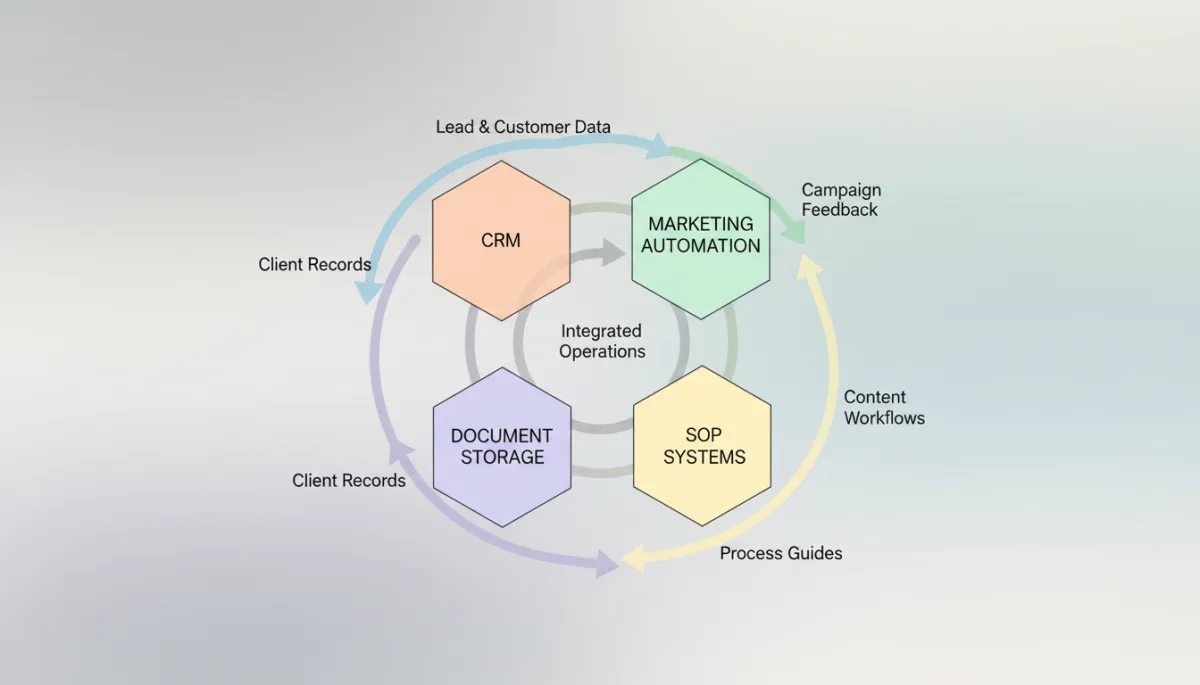
Clear ownership and data flows between tools eliminate double-handling and reporting blind spots.
3. SharePoint & SystemHub: Document Storage and Knowledge Centers
Every growing business needs a document storage system that everyone can access and where they can find what they need in under one minute. For most small to medium businesses, we recommend Microsoft 365 – particularly SharePoint and Teams – and for larger organisations, we layer in SystemHub as a dedicated knowledge center.
SharePoint: Everyday Document Storage with Clear Visibility
With Microsoft’s recent SharePoint updates focusing on a cleaner interface and tighter Microsoft 365 integration, SharePoint remains a powerful backbone for document management (Microsoft Tech Community). We love SharePoint because the platform view makes it easy to see where your documents are, instead of digging through email attachments or local folders.
To make SharePoint an asset instead of a maze, configure it with:
A clear information architecture – separate sites or libraries for Operations, Clients, Finance, and Marketing. Within Clients, use one folder per client with a standard structure (e.g. 01_Contracts, 02_Strategy, 03_Reports).
Permissions by role, not by person – create groups like “Account Managers”, “Delivery Team”, “Leadership” and assign access at the library or site level. This protects sensitive information while keeping day‑to‑day work friction‑free.
Integration points – link client folders from SharePoint into ClickUp or Teamwork tasks, as well as into Ivorey resources, so team members can click straight into the right documents from the tool they’re already using.
Microsoft 365: Central Operations Hub
Microsoft 365 (SharePoint & Teams) centralises all business operations, file management, and team communication into one secure hub, replacing chaotic email chains with structured digital folders and channels. When configured well, your team knows exactly where to store and find information, and collaboration becomes far smoother.
SystemHub: Knowledge Center for Larger Teams
For larger companies, we recommend using SystemHub as a central knowledge center so that all team members can easily access your standard operating procedures and “how we work” documentation. Rather than replacing your tools, SystemHub explains how to use them together and acts as a searchable library of checklists, workflows, and best practices.
💡 Pro Tip: Decide that “if it’s a file, it lives in SharePoint” and “if it’s a process, it lives in SystemHub.” These simple rules dramatically reduce lost documents and inconsistent ways of working.
4. Accounting: Xero & Float for Financial Clarity and Forecasting
To round out a modern, scalable tech stack, you need simple accounting software with forecasting and budgeting that gives you a clear view of cash flow and profitability. At Elevate Living Pty Ltd, we often recommend pairing Xero with Float so you can keep day‑to‑day bookkeeping streamlined while also planning ahead with confidence.
Xero & Float: Simple Accounting with Powerful Forecasting
The accounting system we love is Xero, paired with Float for forecasting. Xero keeps your day‑to‑day bookkeeping, invoicing, and reconciliation simple and accessible, while Float connects to Xero to forecast expenses and revenue so you can make confident decisions about hiring, investing, and scaling.
When configured properly, this combination moves you from “looking backwards” at your numbers to proactively planning your cash flow and growth.
📌 Key Takeaway: Treat your accounting and forecasting tools as decision engines, not just compliance tools. Accurate, timely data here underpins every strategic move you make.
5. AI: A Professional Digital Assistant Across Your Organisation
Finally, a professional AI assistant is now a core tool in its own right – one that should be considered across your entire organisation for security, governance, and integration. Rather than a one‑off experiment, AI needs to be implemented intentionally so it supports your team’s work while protecting client data and aligning with your existing systems.
Professional AI Assistants: Gemini Business & Enterprise
A professional AI assistant like Gemini Business or Gemini Enterprise can be embedded into your workflows to:
Draft emails, proposals, and marketing content aligned with your brand voice.
Refine client strategies, create meeting summaries, and suggest next steps.
Automate multi‑step administrative workflows while maintaining enterprise‑grade data privacy.
Because AI can touch everything from sales and marketing to delivery, finance, and HR, it’s important to design how it plugs into your tech stack – which tools it can access, what data it can see, and how outputs are reviewed. This ensures you get the benefits of speed and creativity without compromising security or quality.
📌 Key Takeaway: Think of your AI assistant as a digital team member that needs clear responsibilities, access rules, and integration points. When paired with strong security and well‑defined processes, it can remove hours of low‑value work from your plate each week.
Bringing It All Together: From Crisis Management to Smooth Operations
When your service business tools are chosen intentionally and set up correctly, you move from reactive, crisis‑driven days to calm, predictable operations. HubSpot and Ivorey keep your sales pipeline, CRM, and front‑end operations organised, ClickUp or Teamwork structures your projects and tasks, Microsoft 365 (with SharePoint and Teams) centralises your documents and communication, Xero and Float give you financial clarity, SystemHub supports larger teams with accessible knowledge, and a professional AI assistant like Gemini Business ties it all together with smart, secure automation.
You don’t need dozens of apps to scale; you need a small number of powerful tools, configured well, integrated cleanly, and supported by clear processes. That’s the difference between a business that constantly feels like it’s rebuilding from scratch and one that can confidently add new clients, team members, and services without breaking.
💡 Pro Tip: If you’re not sure where to start, audit what you already have. Ask: “What is this tool’s primary job?” and “Where should this data really live?” Often, improvement comes from simplifying, not adding more.
Ready to Build a Tech Stack That Actually Supports Your Growth?
At Elevate Living Pty Ltd, our role is to act as your strategic operations partner – fixing the foundations, designing a scalable tech stack, and building the systems that free you from day‑to‑day bottlenecks. If you’re ready to align tools like HubSpot, Ivorey, ClickUp or Teamwork, Microsoft 365 (SharePoint & Teams), Xero, Float, SystemHub, and professional AI assistants such as Gemini Business into a cohesive operating system, we’d love to help.
Book a FREE Discovery Call to review your current tools, identify gaps, and map out a clear, practical plan for a well‑structured tech stack that supports the next stage of your growth.
This article may contain affiliate links. If you choose to purchase through these links, Elevate Living Pty Ltd may earn a small commission at no additional cost to you. We only recommend tools we genuinely use or trust.